
0%
UVIO
CARE logo

CARE - AI support platform for Air Canada agents

Turning live passenger calls into clear actions, before AI assistants became the norm.

Project at a glance

Overview
Internal AI powered support platform
Scope
40+ screens
Our role
Research, UX wireframes, clickable prototype, UI design, design system
Industry
AI Customer Support

Introduction

Back in 2020, CARE explored something that feels obvious today. What if AI could listen to a live support call, understand what the passenger needs and immediately help the agent solve it?

The system followed the conversation in real time, found relevant passenger and flight information, surfaced the latest Air Canada instructions and turned the situation into a clear action plan for the agent.

Problem

Air Canada agents had to think, talk and search at the same time. While helping a passenger on the phone, they might need to find flight details, understand the passenger’s history and search through constantly changing internal instructions.

The information was there, but finding the right piece at the right moment took time. Longer searches meant longer calls and more pressure on the agent.

Our challenge was to turn a huge amount of information into something simple: listen to the conversation, understand the context and show the agent exactly what matters next.

How we solved it

  1. Research and interviews

    UNDERSTAND THE CALL

    We worked with the product and development teams to understand how agents handle live calls, where time is lost, and what information matters most.

  2. UX around the live call

    DESIGN FOR THE MOMENT

    We shaped the experience around one core scenario: helping an agent during a live conversation without forcing them to search across multiple systems.

  3. Clickable prototype

    Validate before building

    We connected the full call journey into a prototype, tested real scenarios with the team, and refined the logic and AI prompts before development.

  4. UI and design system

    MAKE COMPLEXITY EASY TO SCAN

    We designed 40+ screens and a reusable design system to keep an information-heavy support product calm, fast, and easy to use during live calls.

Home

Before taking calls, agents needed a quick way to catch up on what changed across Air Canada.

New policies, operational updates and internal instructions could directly affect how they handled the next passenger.
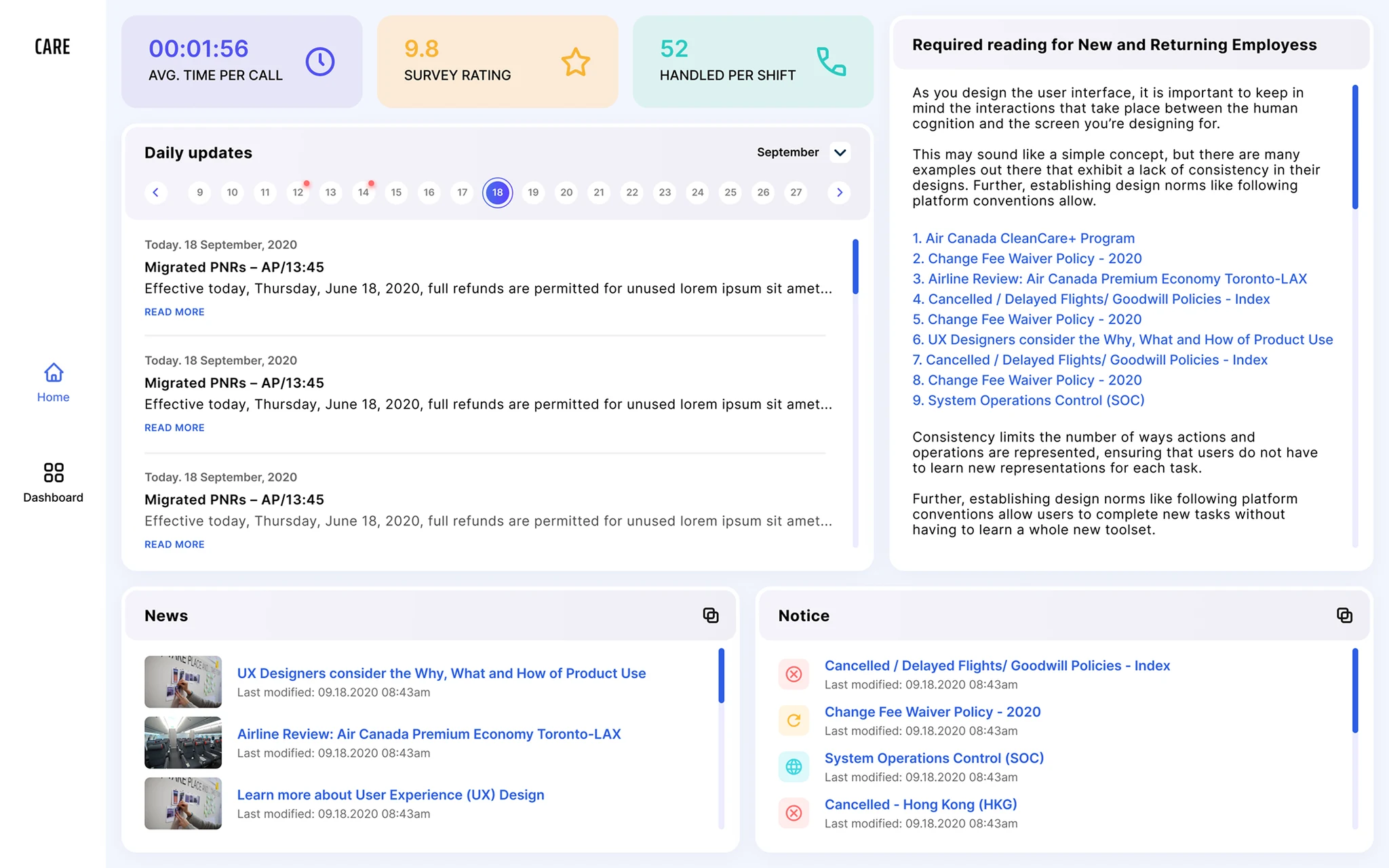
Home screen

What we focused on

  • Put the latest operational updates and instructions right on the home screen.
  • Kept the overview short and easy to scan before a shift.
  • Prioritized what actually changed, instead of forcing agents to search through the full knowledge base.

Impact

Agents start calls with fresher context and spend less time discovering important changes while a passenger is already waiting.
Live Call

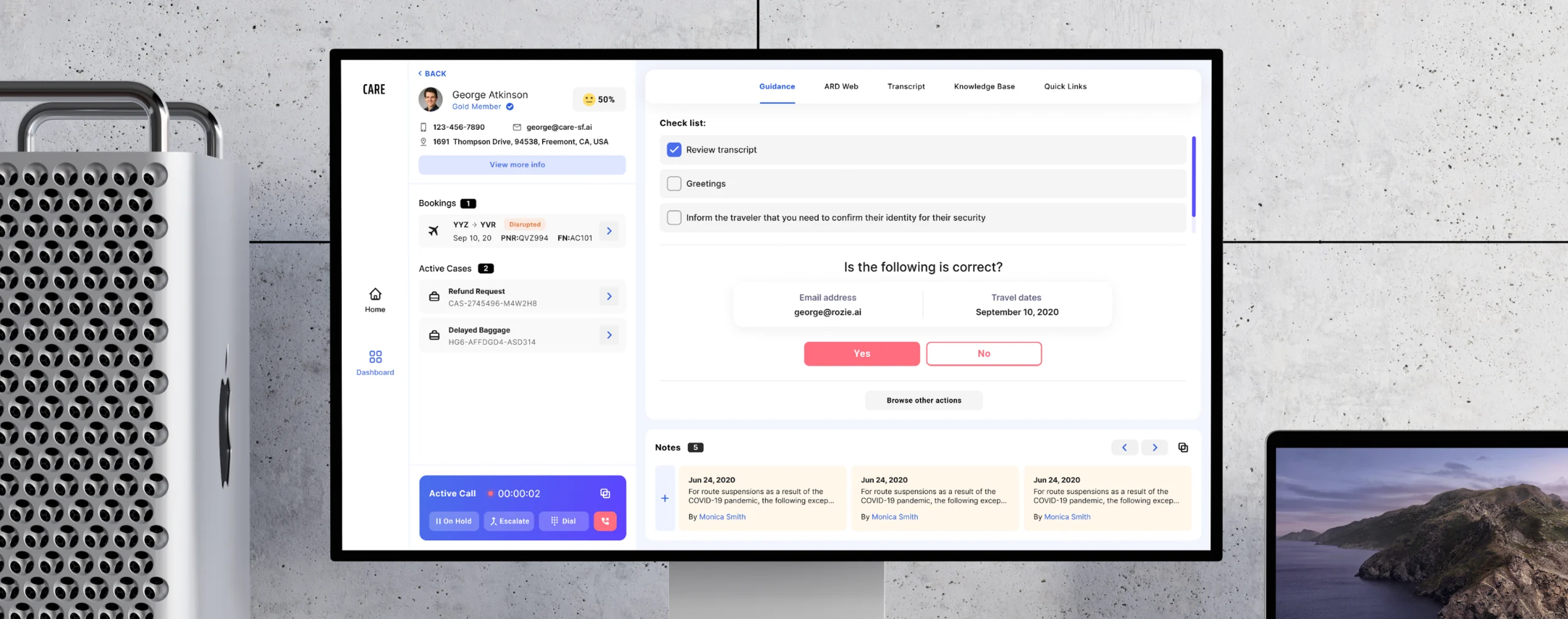
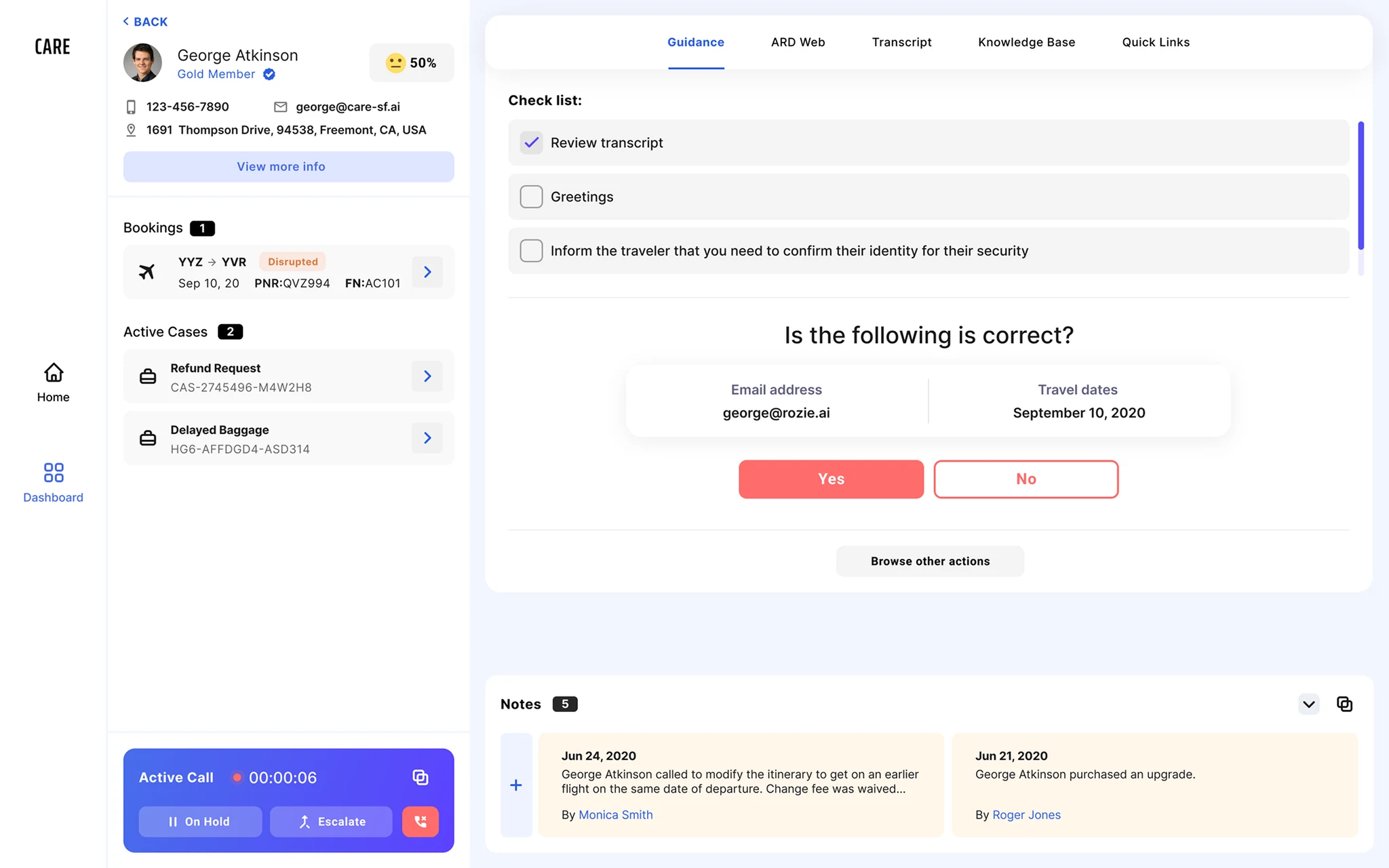
During a live call, agents needed passenger details, flight context and the right instructions without breaking the conversation.

We designed the main workspace around exactly that moment.

Live Call screen

What we focused on

  • Show passenger and flight information as soon as the call starts.
  • Let AI follow the conversation and understand what the passenger needs.
  • Surface the right instructions, policies and internal materials in real time.
  • Turn that context into a clear checklist of what the agent should do next.

Impact

Instead of searching while the passenger waits, agents get the right context and next steps directly inside the call screen. That means faster answers, shorter calls and much less pressure on the support team.

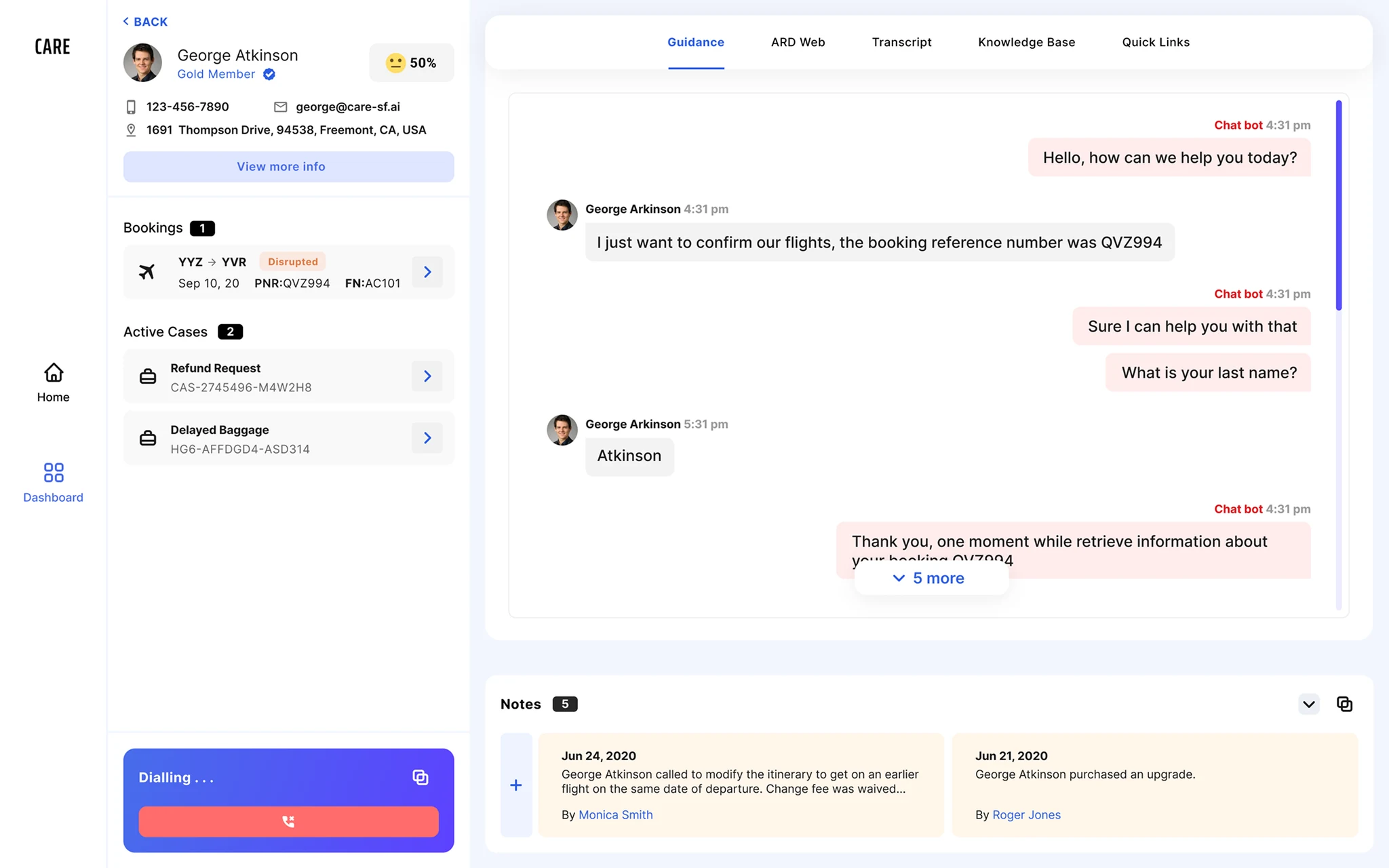
AI Guidance

Air Canada instructions changed often, which meant agents could not rely on memory alone.

During a live call, finding the latest rule or procedure could take valuable time.

AI Guidance screen

What we focused on

  • Let AI match the live conversation with the right internal instructions.
  • Surface only the material relevant to that specific passenger and situation.
  • Turn long procedures into short, actionable steps the agent can follow immediately.
  • Keep supporting information close, so agents can check details without leaving the call flow.

Impact

Agents spend less time searching and more time actually helping the passenger. The latest guidance appears when it matters, making support faster, more consistent and easier to handle under pressure.

Clickable Prototype

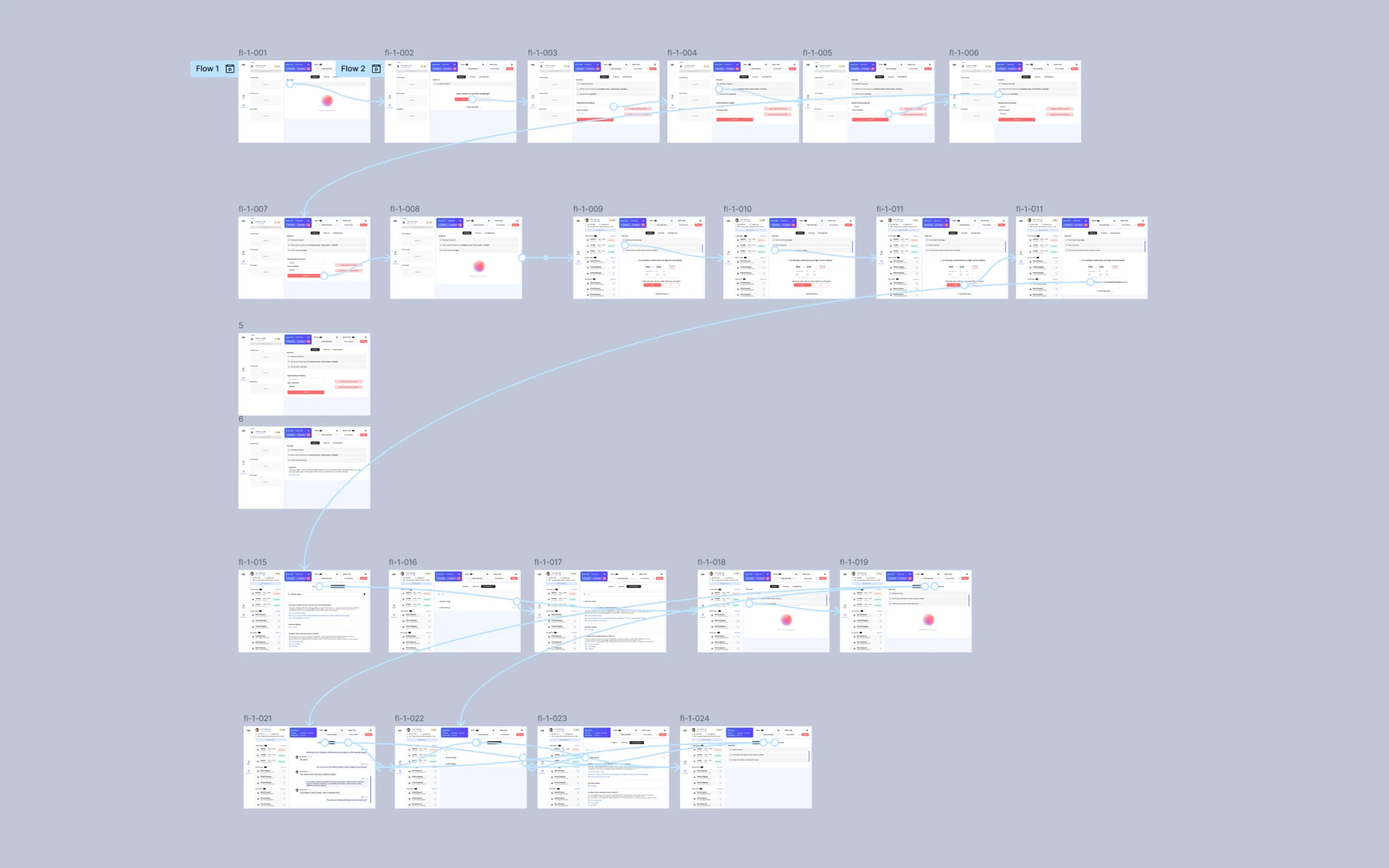
We connected the full experience into a clickable prototype and walked through real scenarios like flight changes, lost baggage and passenger requests with the team.

Clickable Prototype screen

What we focused on

  • Tested how passenger data, AI guidance and actions work together during a live call.
  • Checked that agents always understand what to do next without breaking the conversation.
  • Refined details and edge cases before handing anything to development.

Impact

The team could experience CARE almost like a real product before writing code, catch problems early and move into development with much more confidence.

Results

In just 8 weeks, CARE went from early research to a complete product experience with 40+ screens, a clickable prototype, full UI and a reusable design system.

The team could walk through the entire support flow before development started, test real call scenarios and hand developers a product that was already thought through in detail.

For us, the most exciting part was building an AI assisted support experience back in 2020, years before this kind of workflow became common. The idea was simple then and still is now: AI should not replace the agent. It should help them find the right answer faster and do their job with less friction.

Clarity is what moves products forward

Start with
a clear next step

We’ll help define a clear path forward

Tell us what you're building