
0%
UVIO
Product Pulse logo

Product Pulse - retail data platform

Helping brands and retailers stay on top of how their products actually perform in retail

Project at a glance

Overview
B2B web platform that connects merchants and retailers for actionable retail data.
What it does
Lets retailers and suppliers register, set up stores, connect their data and use Product Pulse as the front door to all retail insights
Scope
Around 200 UX and UI screens across merchant, supplier and admin areas
Our role
UX research, UX flows, IA, UI design, design system, clickable prototypes, frontend and backend development
Industry
Retail and CPG, data and analytics infrastructure

Introduction

Product Pulse connects retailers and suppliers around the same product data so everyone finally sees the same picture. Instead of chasing Excel files, PDFs and screenshots, teams get one place to track data.

The vision was strong, but the experience had to cover very different roles and a lot of data. We came in to design the structure, flows and UI so that busy teams can use it every day without feeling lost.

Problem

The market clearly wanted near real time retail data, and Fincretive kept hearing from suppliers that it was hard to act fast when numbers arrived late or in scattered reports. When they came to us with Product Pulse, it was essentially a strong idea in a slide deck, not a ready product.

Our job was to turn that “napkin concept” into a full service from scratch, designing flows, roles and extra business logic on top of the existing data platform. There were no products to copy, so every step and screen you see below was invented, discussed and refined together with the client.

How we solved it

  1. Research and user stories

    UNDERSTAND THE USERS

    We ran a short survey and calls with the client team to define user types, goals, and edge cases, then turned them into structured user stories around real work and real risks.

  2. UX flows and prototype

    STRUCTURE AND VALIDATE

    We mapped low-fidelity flows and screens, removed unnecessary complexity, and built a clickable prototype to validate the experience with the client and early prospects before moving into UI.

  3. UI design

    DEFINE THE EXPERIENCE

    We set the visual direction with a moodboard, then designed a clean, data-friendly interface that landed very close to final in the first round.

  4. Development

    BUILD FOR REAL USE

    We developed the frontend and backend, preserved the key UX decisions, connected the product to Fincretive data, and kept the system flexible for new clients and use cases.

Merchant Dashboard

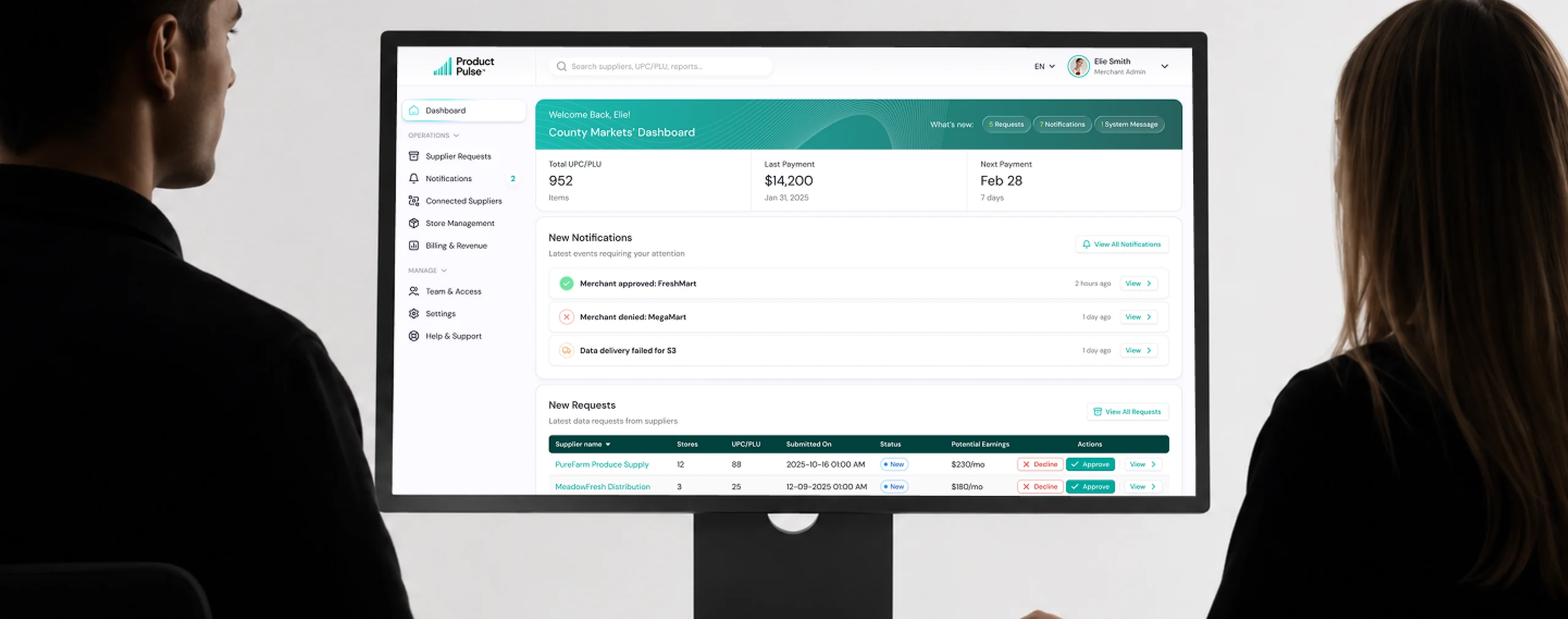
Product Pulse had to give merchants one clear place to manage everything around their data, without turning the dashboard into another analytics tool.

The key question was simple: who wants access, what exactly are they asking for, and what value does it bring?
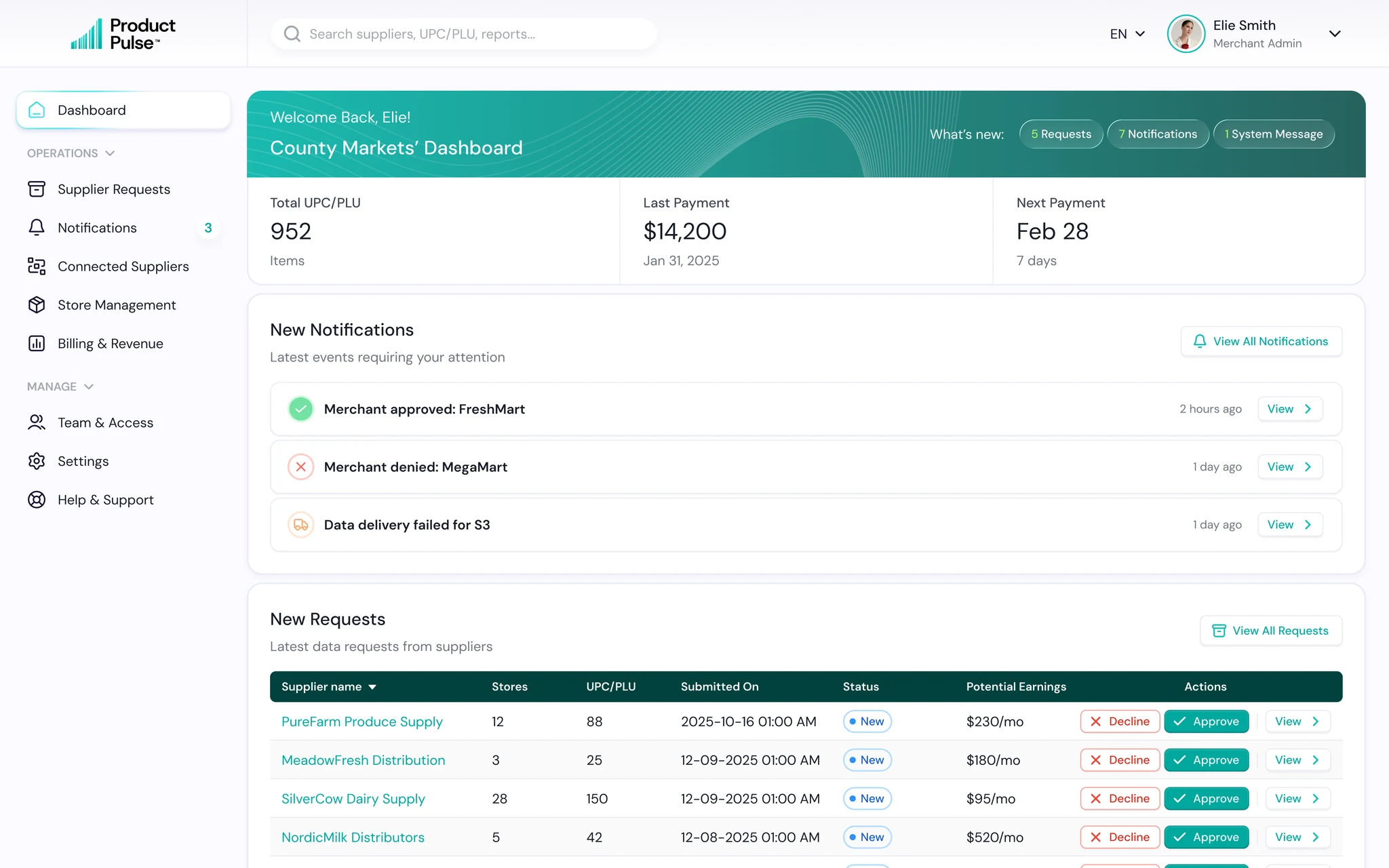
Merchant Dashboard screen

What we focused on

  • Put new supplier requests front and center, with stores, UPC/PLU scope, potential earnings and clear Approve or Decline actions.
  • Kept connected suppliers visible in the same view, including their activity, access status and monthly earnings.
  • Added only the business numbers that matter here: upcoming payments, revenue trend and payment history.
  • Used notifications to surface events that actually need attention instead of making users hunt through the platform.

Impact

A merchant can open Product Pulse and understand the state of their supplier network in seconds: what needs a decision, who already has access and what that access is generating. It turns complex data relationships into a simple, manageable business workflow.
Supplier Requests

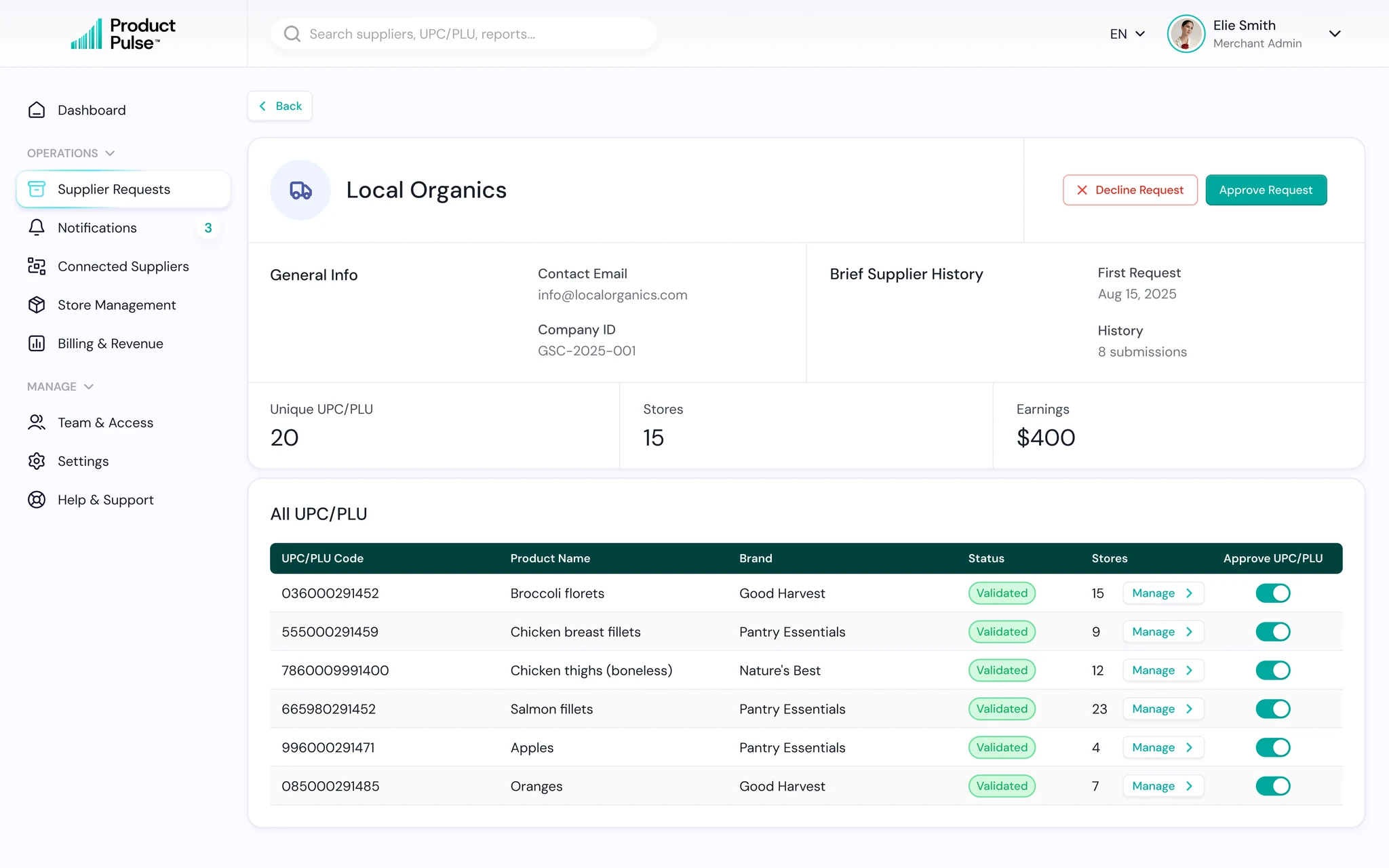
A merchant may receive many requests from different suppliers, each asking for access to different stores and UPC/PLU.

We designed the flow so merchants do not have to treat every request the same way.

Supplier Requests screen

What we focused on

  • Added quick Approve and Decline actions directly in the list for obvious cases, with stores, UPC/PLU count and potential earnings visible before opening anything.
  • For complex requests, merchants can open a detailed view, review the supplier, requested products and stores, and approve access at a more granular level.
  • Kept supplier history across requests, including previous submissions and relationship data, so every new decision comes with context instead of starting from zero.
  • Added filters and automation rules for merchants handling higher request volumes.

Impact

Simple requests take seconds, while bigger decisions still get the depth they need. Merchants stay in control of who gets access to what, without turning every request into a long manual review.

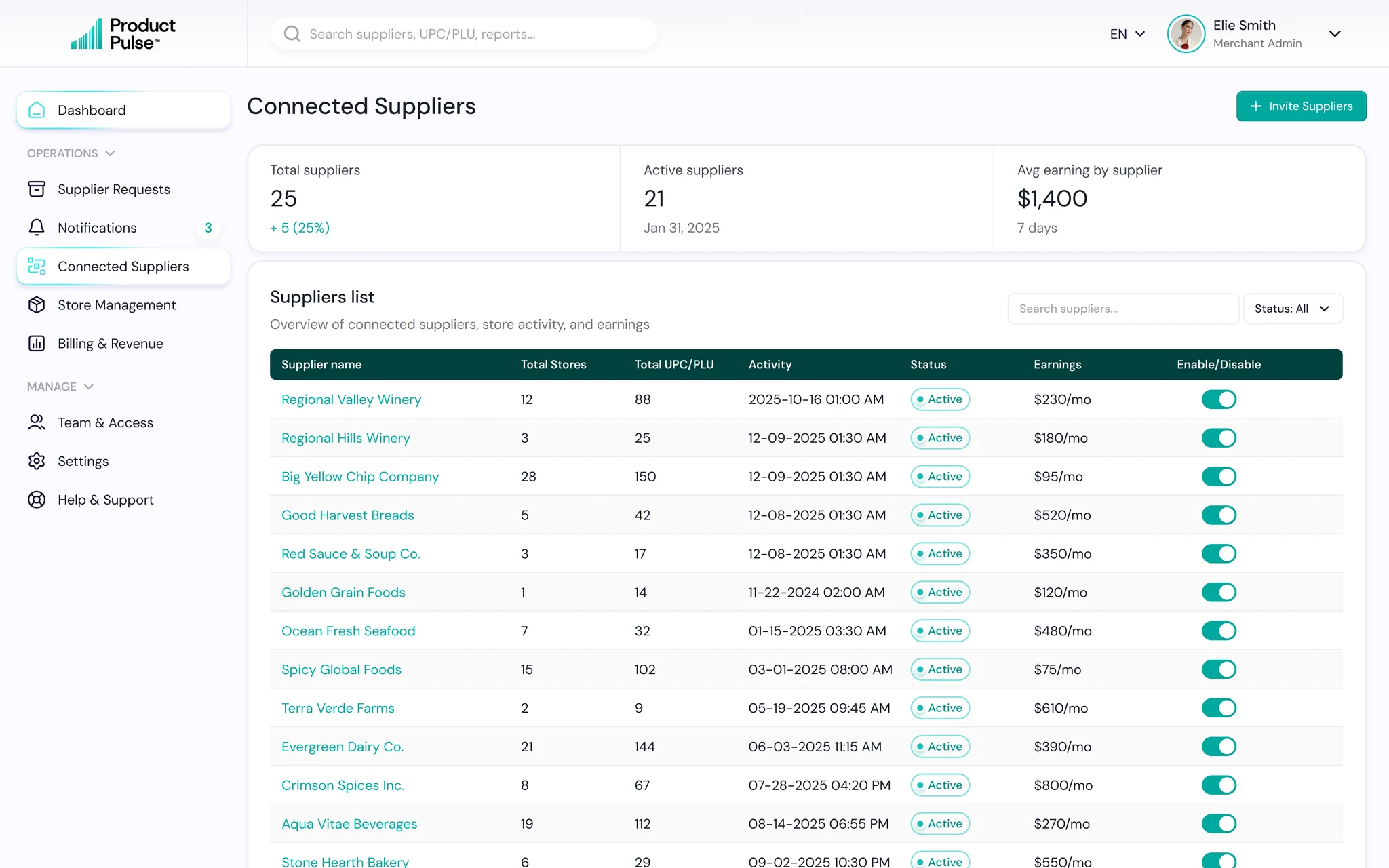
Supplier and Store Management

Managing connected suppliers or maintaining dozens of stores can easily turn into heavy admin work.

Our goal was to make both tasks feel light, predictable and fast.

Supplier and Store Management screen

What we focused on

  • Show only the information needed to make a decision, with deeper details available when needed.
  • Keep the same table, status and action patterns across different sections so users do not have to relearn the interface.
  • Make common actions like enable, disable, search, filter or bulk upload available right where the work happens.
  • Design for scale from day one, so the same experience still works when the number of suppliers or stores grows significantly.

Impact

Routine management stays fast and easy, even as the network grows. Users spend less time navigating the system and more time actually managing their business.

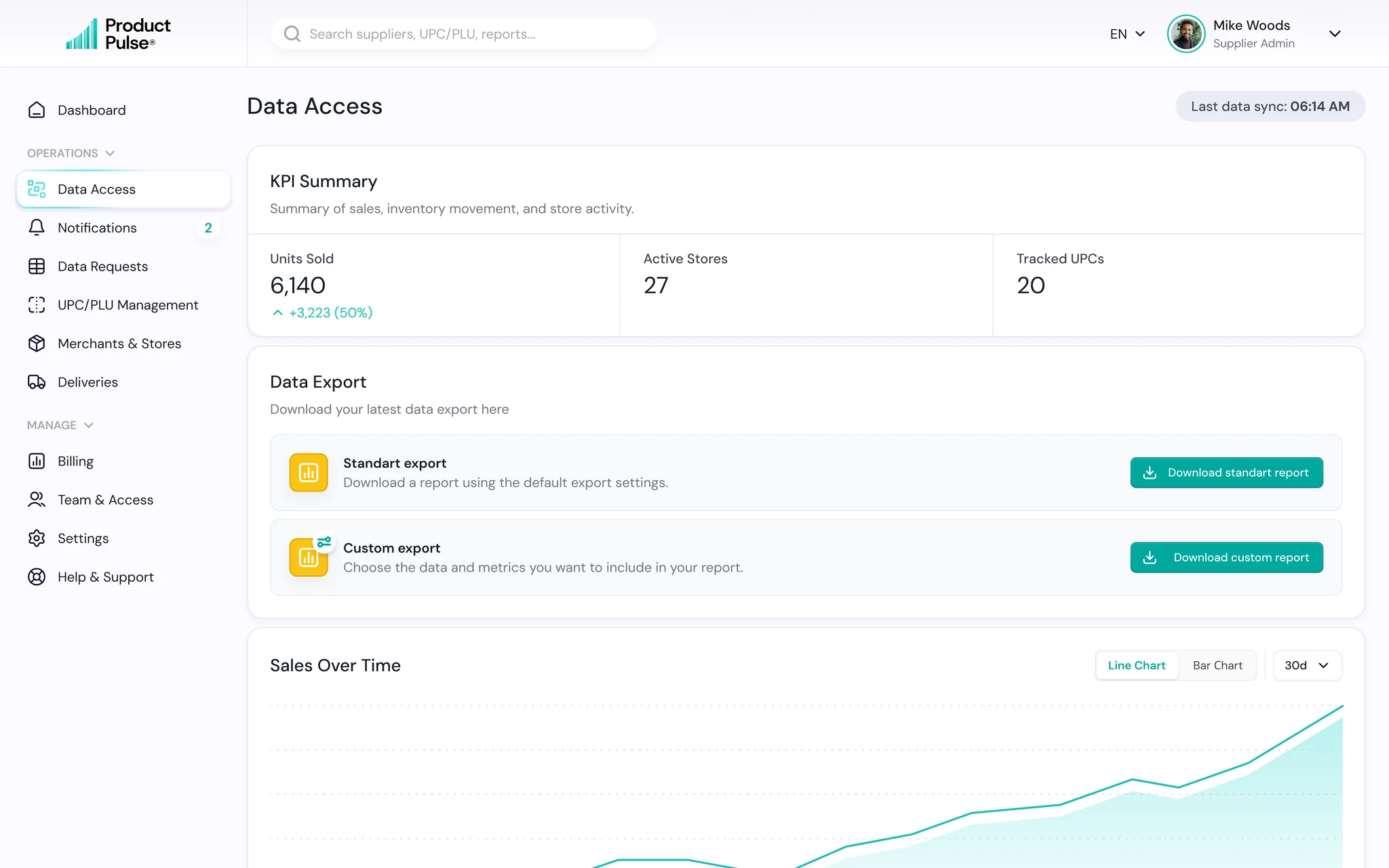
Data Access

This is the moment suppliers come to Product Pulse for.

Fresh retail data is pulled in daily and turned into a clean, focused view that helps teams understand what is selling, where it is selling and what deserves attention next.

Data Access screen

What we focused on

  • Put the most useful KPIs first: units sold, active stores and tracked UPCs.
  • Show the latest sync time, so users always know how fresh the data is.
  • Keep charts simple and focused on trends, with no visual noise or unnecessary analytics.
  • Surface top products and top stores right on the page, so strong and weak performance is easy to spot.
  • Offer both standard and custom exports for teams that need to take the data further.

Impact

Instead of waiting for reports or digging through spreadsheets, suppliers open one screen and get a clear picture of what is happening across their products and stores. Fast, fresh and easy to act on. This is the core value Product Pulse delivers.

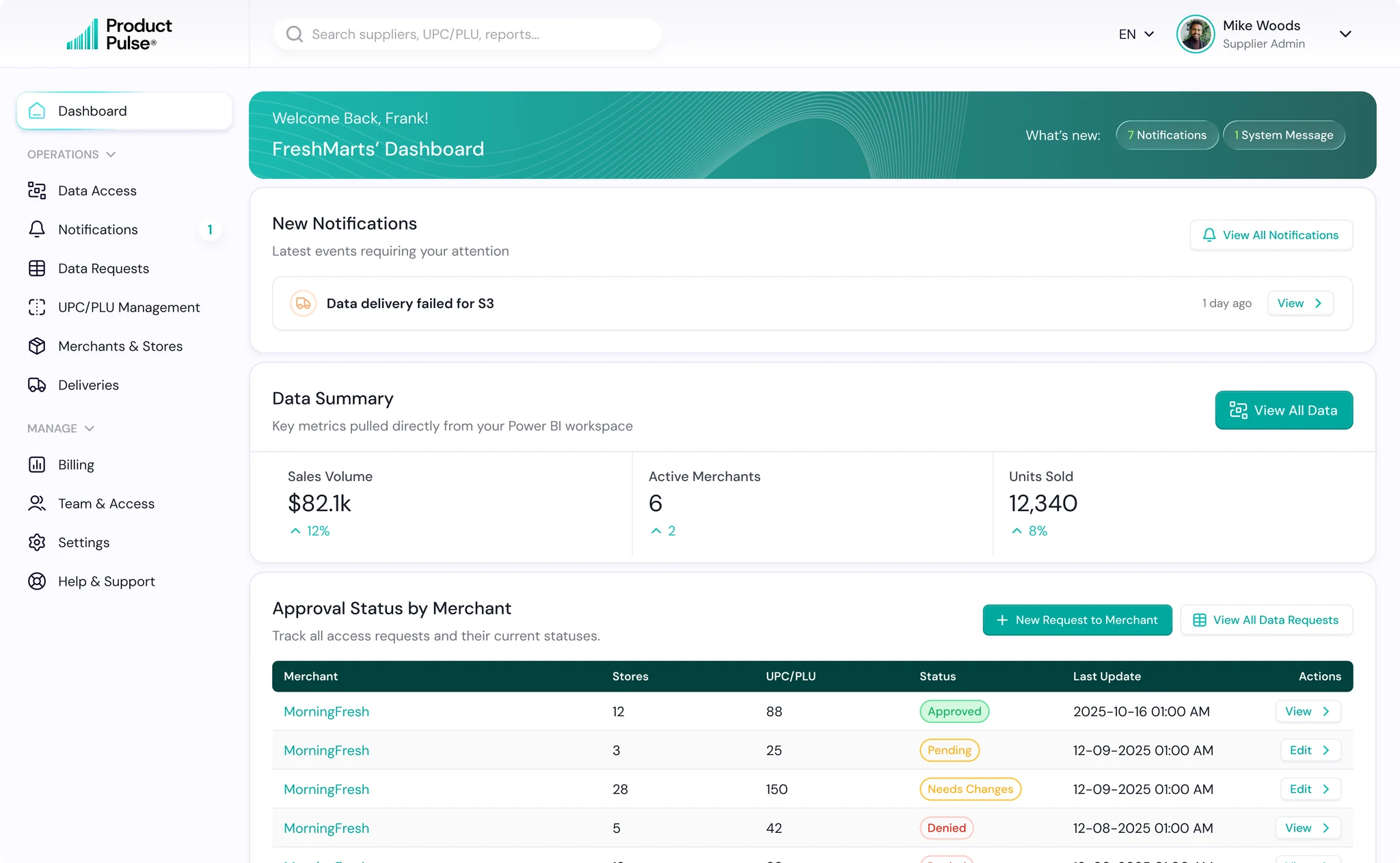
Supplier Dashboard

For suppliers, the key questions are different: what data can I access, which merchants approved me, and what still needs action?

We built the dashboard around exactly that.

Supplier Dashboard screen

What we focused on

  • Put important updates first, including approvals, denials and delivery issues.
  • Added a clear data summary pulled from Power BI, so suppliers can see the value they already have access to without turning Product Pulse into another analytics tool.
  • Made request statuses visible by merchant, with clear states like Approved, Pending, Needs Changes and Denied.
  • Kept the next action obvious, whether it is opening approved data, fixing a request or creating a new one.

Impact

Suppliers always know where they stand and what to do next. The dashboard connects access, requests and available data into one clear workflow without adding unnecessary complexity.

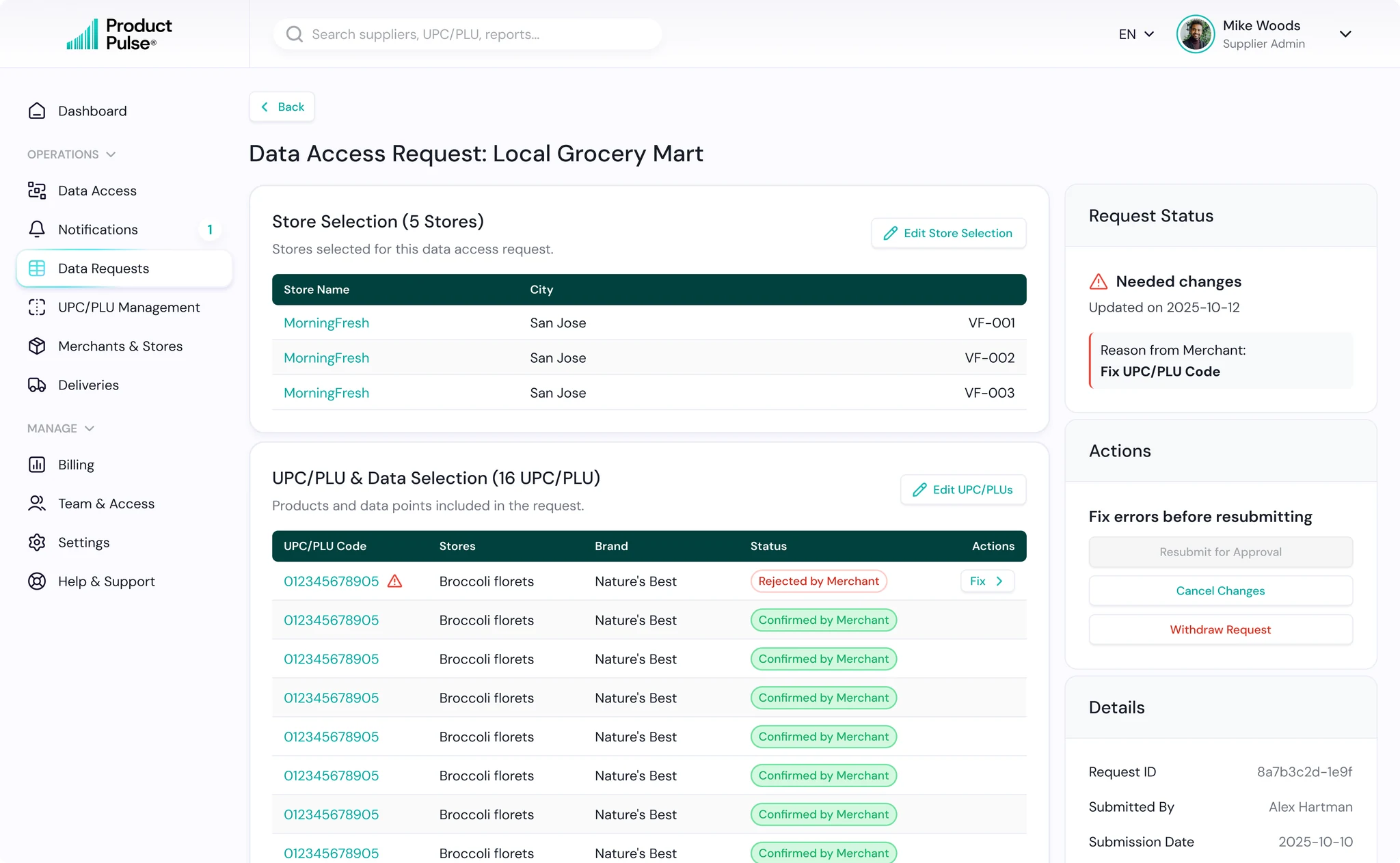
Data Requests

Requesting access from a merchant can easily become a long email chain.

We designed Product Pulse so the entire conversation happens inside one clear flow, with every status, correction and next step already thought through.

Data Requests screen

What we focused on

  • One request list shows the merchant, stores, UPC/PLU scope, status and last update, so suppliers instantly know where every request stands.
  • Every status has its own next action. Approved can be viewed, Pending can still be edited, Needs Changes can be fixed and resubmitted, and Denied stays available for reference.
  • Merchant feedback appears directly inside the request, next to the exact UPC/PLU that needs attention.
  • Suppliers can fix only what was rejected instead of rebuilding the whole request from scratch.
  • Store selection, product access, request details and the full activity history stay together, so nothing gets lost between revisions.

Impact

Suppliers always know where they stand and what to do next. The dashboard connects access, requests and available data into one clear workflow without adding unnecessary complexity.

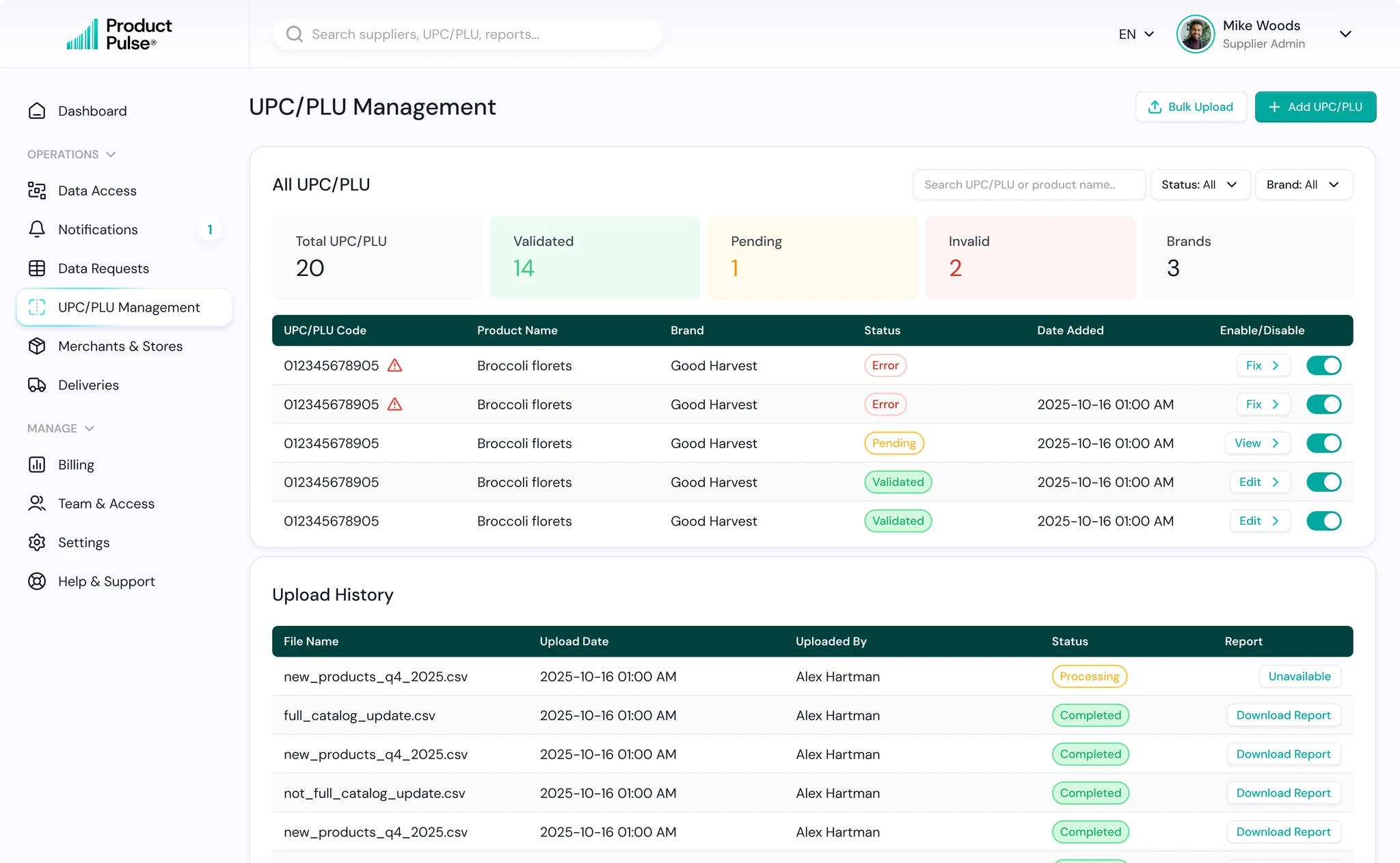
UPC/PLU Management

For suppliers, UPC/PLU data is the foundation of every request. If a code is wrong or incomplete, everything downstream gets harder.

So we designed this section to make product data easy to upload, validate, fix and maintain at scale.

UPC/PLU Management screen

What we focused on

  • Clear status for every UPC/PLU: Validated, Pending or Error, so problems are visible immediately.
  • Direct Fix, View and Edit actions instead of forcing users through extra screens.
  • Bulk upload for large catalogs, with upload history and downloadable reports for every file.
  • Quick summary of total products, validation status and brands, so suppliers always know the health of their catalog.
  • Simple enable or disable controls for products that should no longer be active.

Impact

Suppliers can keep large product catalogs accurate without turning data cleanup into a manual project. Errors are caught early, fixes are obvious, and only clean UPC/PLU data moves forward into merchant requests.

Development

Development started with almost no guesswork. The designs were fully prepared for handoff, backed by a complete design system with component states, empty states and edge cases already defined. That saved time from day one and kept implementation close to the original UX.

Frontend and backend were built in parallel. We used Next.js on the frontend and Go on the backend, connected through APIs, while the database structure and core platform logic were designed alongside both streams.

Our Agile process kept design, development and QA moving together instead of waiting for one phase to finish before the next started. The result was a fully functional MVP for all user types in just four months, with final QA taking only around 2 to 3 weeks despite the size and complexity of the platform.

Built for every role

Product Pulse is not just a Merchant and Supplier platform. We also designed dedicated experiences for Validators, Admins, Resellers and internal teams, with each role seeing only the tools and data they actually need. Validators get a focused request queue, Admins see platform health, users, payments and activity, while Resellers can manage referral links, activations and commissions.

The result is one product with multiple role-specific experiences, all following the same design logic. Everyone gets a workspace that feels simple for their job, without being exposed to the complexity of the whole platform.

Clarity is what moves products forward

Start with
a clear next step

We’ll help define a clear path forward

Tell us what you're building